> ## Documentation Index
> Fetch the complete documentation index at: https://docs.bloxcord.net/llms.txt
> Use this file to discover all available pages before exploring further.
# Age Check
> Age Check is BloxCord's built-in age verification system, designed to help your organization confirm users meet your age requirements without staff ever handling personal documents. Users complete a quick verification that combines a guided face scan with AI-powered checks for liveness, consistency, and age estimation, then returns a clear result for administrators to review.
Age Check must be enabled before age verification sessions and results can be viewed or managed. Visit the Features tab to get started.
 ## How It Works
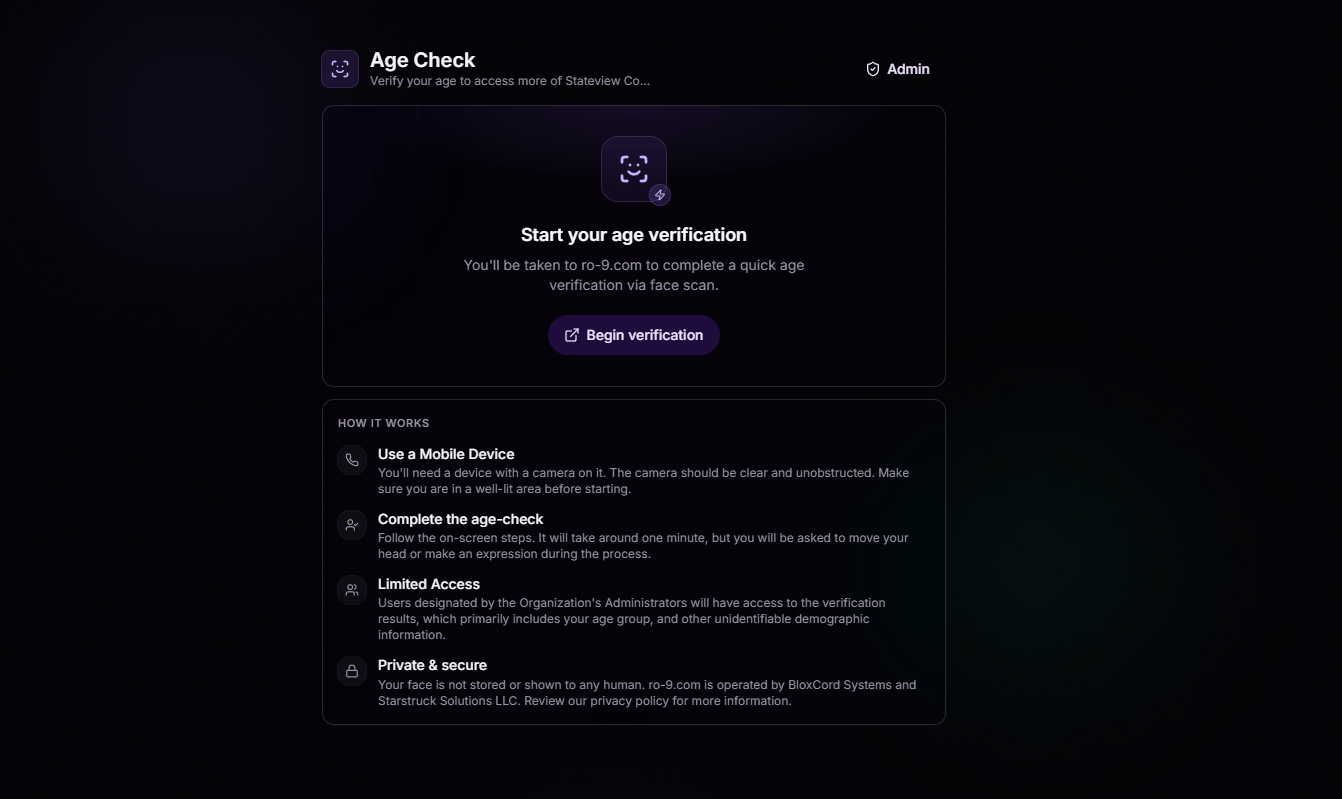
The user opens Age Check and taps **Begin verification**. They're taken to a BloxCord-affiliated site to complete the process on a mobile device with a camera.
The user enters their year of birth, allowing BloxCord to compare their claimed age against the estimated age from the verification.
They follow simple on-screen prompts, moving their head or making expressions. The scan takes around a minute and is used only to estimate age.
BloxCord's AI analyzes the verification for liveness, consistency, and facial matching, comparing the submitted images against age-specific AI models trained for different age groups before returning a result that authorized administrators can review.
## Your Privacy, Our Priority
Age Check was built with privacy first. **Your face is never stored, never shown to a human, and never used for anything beyond verifying your age.**
## Frequently Asked Questions
Age Check captures a short series of images and processes them through an automated AI age estimation system. The estimated age is compared against the information you provide to verify eligibility. Images and any facial analysis derived from them are used only for age verification, are never stored, and are never used to identify you or for any other purpose.
No. Your images are processed entirely by automated systems. They are never viewed or manually reviewed by our staff and are deleted after the verification is complete.
Age estimation may be performed using a trusted third-party AI provider that processes images on our behalf to return an age estimate. Where required by law, this processing is based on your consent. If you choose not to use Age Check, some features or access may be unavailable.
After an Age Check is completed, authorized Owners and Administrators can view the verification result, the user's declared and estimated age groups (such as 13–14, 15–17, or 18–20), liveness status (Passed or Failed), and the number of devices used during verification. The underlying images are never shared with your organization.
The verification site is operated by BloxCord Systems and Starstruck Solutions LLC. It exists solely to perform Age Check verifications and is not used for any other purpose.
Read the full policy at [bloxcord.net/privacy](https://bloxcord.net/privacy).
## How It Works
The user opens Age Check and taps **Begin verification**. They're taken to a BloxCord-affiliated site to complete the process on a mobile device with a camera.
The user enters their year of birth, allowing BloxCord to compare their claimed age against the estimated age from the verification.
They follow simple on-screen prompts, moving their head or making expressions. The scan takes around a minute and is used only to estimate age.
BloxCord's AI analyzes the verification for liveness, consistency, and facial matching, comparing the submitted images against age-specific AI models trained for different age groups before returning a result that authorized administrators can review.
## Your Privacy, Our Priority
Age Check was built with privacy first. **Your face is never stored, never shown to a human, and never used for anything beyond verifying your age.**
## Frequently Asked Questions
Age Check captures a short series of images and processes them through an automated AI age estimation system. The estimated age is compared against the information you provide to verify eligibility. Images and any facial analysis derived from them are used only for age verification, are never stored, and are never used to identify you or for any other purpose.
No. Your images are processed entirely by automated systems. They are never viewed or manually reviewed by our staff and are deleted after the verification is complete.
Age estimation may be performed using a trusted third-party AI provider that processes images on our behalf to return an age estimate. Where required by law, this processing is based on your consent. If you choose not to use Age Check, some features or access may be unavailable.
After an Age Check is completed, authorized Owners and Administrators can view the verification result, the user's declared and estimated age groups (such as 13–14, 15–17, or 18–20), liveness status (Passed or Failed), and the number of devices used during verification. The underlying images are never shared with your organization.
The verification site is operated by BloxCord Systems and Starstruck Solutions LLC. It exists solely to perform Age Check verifications and is not used for any other purpose.
Read the full policy at [bloxcord.net/privacy](https://bloxcord.net/privacy).