> ## Documentation Index
> Fetch the complete documentation index at: https://docs.bloxcord.net/llms.txt
> Use this file to discover all available pages before exploring further.
# API Integration
> Connect your game and everything around it. Game Keys power BloxCord's Roblox integrations, while Auth Keys let external applications securely connect to the platform. Every request made with either key is automatically logged, giving you complete visibility into how they're being used.
## Game Keys
**The Game Key is the bridge between your game and BloxCord.** Add it to your Roblox game once, and BloxCord can power features like activity tracking, logbook enforcement, replay recording, and more.
Every Game Key is fully configurable. Enable only the features you need and restrict the key to specific Roblox places, ensuring it can only be used where you intend.
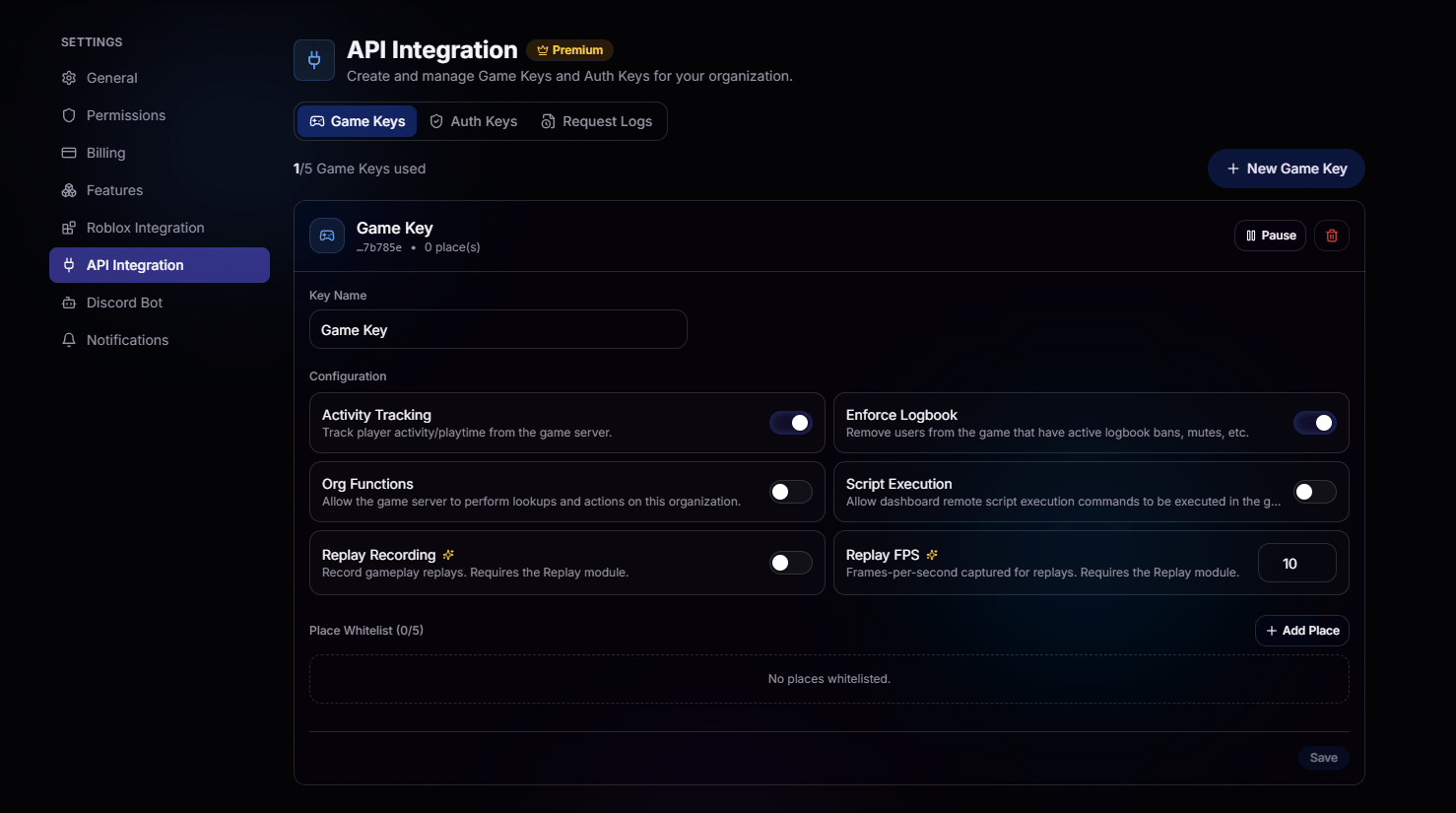 Toggle Activity Tracking, Logbook Enforcement, Organization Functions, Script Execution, Replay Recording, and more on a per-key basis.
Restrict each key to up to 5 Roblox places. Requests from anywhere else are rejected.
Game Keys are shown **only once** at creation. Copy it, store it somewhere safe, and never share it.
## Auth Keys
**Auth Keys connect your applications to BloxCord.** Whether you're building a companion website, a Discord bot, or an internal tool, Auth Keys let your applications securely access BloxCord's features without rebuilding them from scratch.
Every Auth Key is linked to a Roblox account, known as the actor, and inherits the roles you assign. Any request made with the key acts on behalf of that account and is limited to its permissions, nothing more.
Organization API Access must be enabled before Auth Keys can be created or managed. Visit the Features tab to get started.
For your security, Auth Keys **automatically expire** after 365 days (1 year).
Toggle Activity Tracking, Logbook Enforcement, Organization Functions, Script Execution, Replay Recording, and more on a per-key basis.
Restrict each key to up to 5 Roblox places. Requests from anywhere else are rejected.
Game Keys are shown **only once** at creation. Copy it, store it somewhere safe, and never share it.
## Auth Keys
**Auth Keys connect your applications to BloxCord.** Whether you're building a companion website, a Discord bot, or an internal tool, Auth Keys let your applications securely access BloxCord's features without rebuilding them from scratch.
Every Auth Key is linked to a Roblox account, known as the actor, and inherits the roles you assign. Any request made with the key acts on behalf of that account and is limited to its permissions, nothing more.
Organization API Access must be enabled before Auth Keys can be created or managed. Visit the Features tab to get started.
For your security, Auth Keys **automatically expire** after 365 days (1 year).
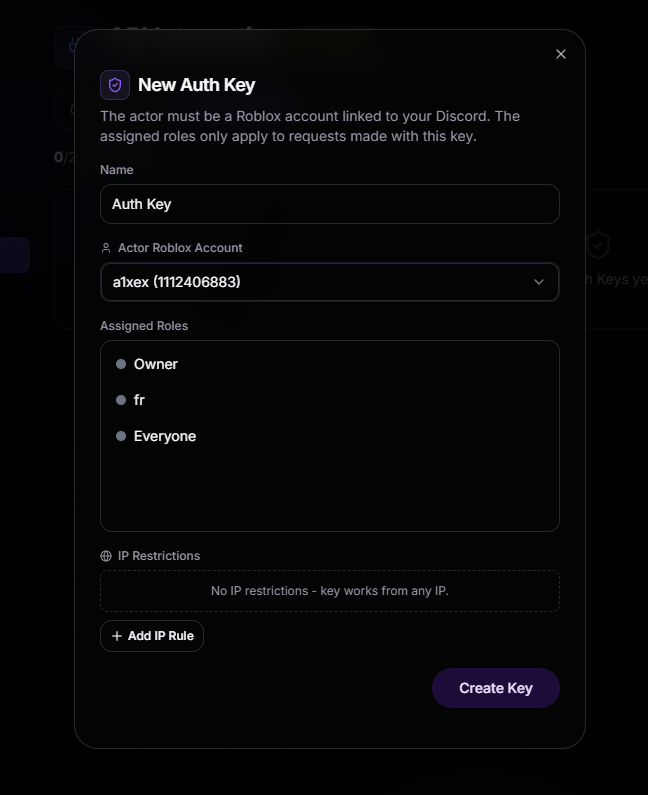 Bind the key to a linked Roblox account and assign the roles that determine what it's allowed to do.
Lock a key to specific IP addresses so only your servers can use it. Leave it open if you need flexibility.
Just like Game Keys, Auth Keys are shown **only once**. Save it the moment it's created, or you'll need to generate a new one.
## Request Logs
Every request leaves a trail. The **Request Logs** tab records every request made with your Game Keys and Auth Keys, including what was called, when it happened, which key made the request, and whether it succeeded. Whether you're debugging an integration or investigating suspicious activity, everything you need is in one place.
Bind the key to a linked Roblox account and assign the roles that determine what it's allowed to do.
Lock a key to specific IP addresses so only your servers can use it. Leave it open if you need flexibility.
Just like Game Keys, Auth Keys are shown **only once**. Save it the moment it's created, or you'll need to generate a new one.
## Request Logs
Every request leaves a trail. The **Request Logs** tab records every request made with your Game Keys and Auth Keys, including what was called, when it happened, which key made the request, and whether it succeeded. Whether you're debugging an integration or investigating suspicious activity, everything you need is in one place.