> ## Documentation Index
> Fetch the complete documentation index at: https://docs.bloxcord.net/llms.txt
> Use this file to discover all available pages before exploring further.
# Permissions
> Build roles that fit your organization. Create up to 50 roles, give each one a name and color, organize them into departments, and define exactly what they can do. Roles can be linked directly to your Roblox group or Discord, making permission management simple and centralized.
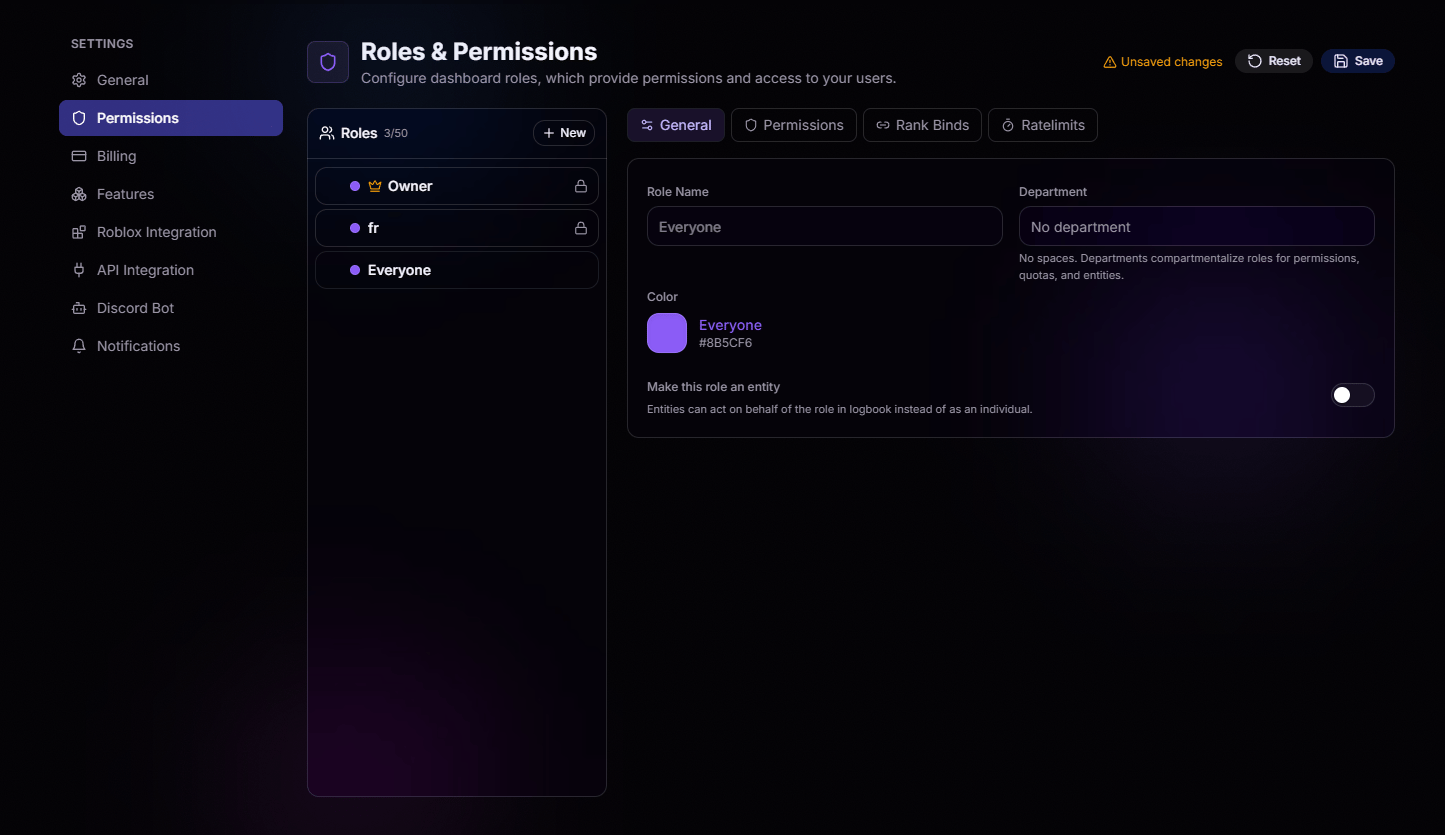 Every role gets its own name and hex color. Colors show up next to members across the dashboard and logbook, so at a glance you know who's who.
Group roles into departments to compartmentalize permissions, quotas, and entities. Perfect for keeping Moderation, Admin, and Staff cleanly separated.
## Permissions On, Permissions Off
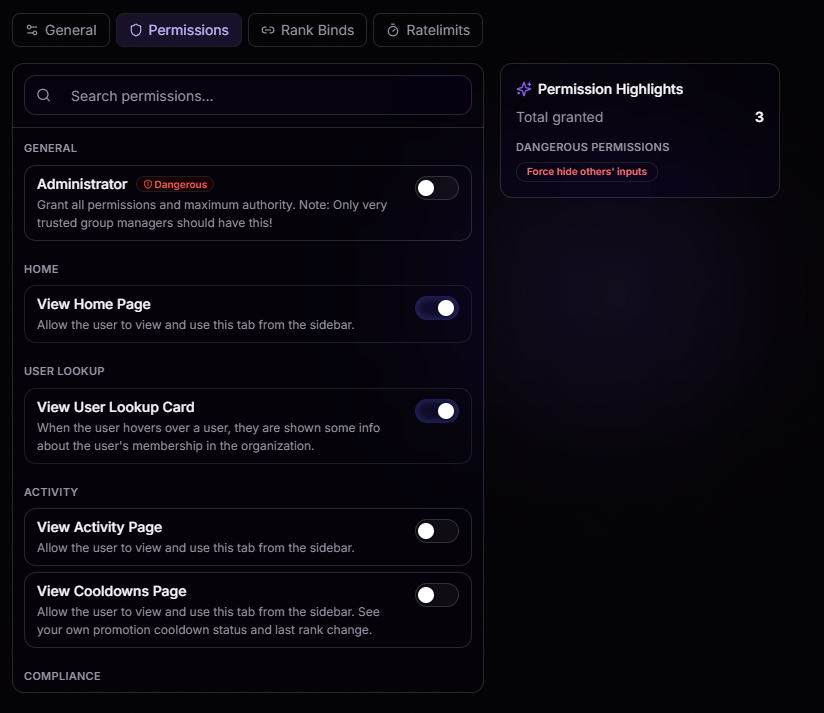
Every permission at your fingertips. Enable or disable permissions with a single click, and use search to instantly find exactly what you're looking for.
**Permission Highlights** gives you a live summary of everything the role can do, including a running count of granted permissions and clear warnings for **Dangerous** permissions, so you always know when a role has elevated access.
Every role gets its own name and hex color. Colors show up next to members across the dashboard and logbook, so at a glance you know who's who.
Group roles into departments to compartmentalize permissions, quotas, and entities. Perfect for keeping Moderation, Admin, and Staff cleanly separated.
## Permissions On, Permissions Off
Every permission at your fingertips. Enable or disable permissions with a single click, and use search to instantly find exactly what you're looking for.
**Permission Highlights** gives you a live summary of everything the role can do, including a running count of granted permissions and clear warnings for **Dangerous** permissions, so you always know when a role has elevated access.
 ## Bind Roles Your Way
Head to the **Rank Binds** tab and connect each role to the source that makes sense for your community:
Bind a role directly to a Roblox group rank. When someone hits that rank, they get the role automatically.
Prefer Discord? Bind straight to a Discord role and let your server handle who gets what.
## Stop the Spam with Ratelimits
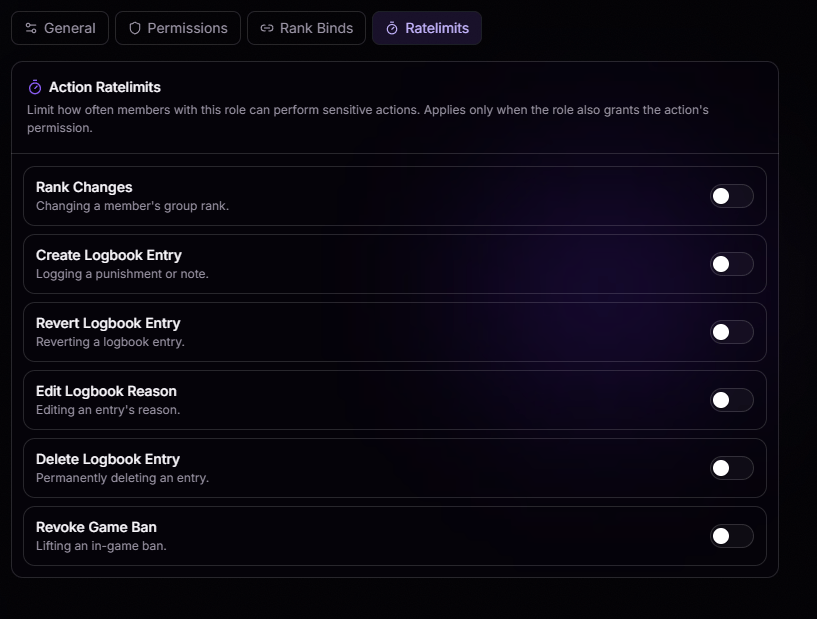
Worried about someone spamming sensitive actions? The **Ratelimits** tab lets you control how often members with a role can perform high-impact actions, helping prevent abuse before it becomes a problem.
Set limits for actions such as:
* Rank Changes
* Creating, Editing, Reverting, or Deleting Logbook Entries
* Revoking Game Bans
Whether it's preventing accidental misuse or slowing down malicious activity, rate limits add an extra layer of protection to your organization without getting in the way of day-to-day operations.
## Bind Roles Your Way
Head to the **Rank Binds** tab and connect each role to the source that makes sense for your community:
Bind a role directly to a Roblox group rank. When someone hits that rank, they get the role automatically.
Prefer Discord? Bind straight to a Discord role and let your server handle who gets what.
## Stop the Spam with Ratelimits
Worried about someone spamming sensitive actions? The **Ratelimits** tab lets you control how often members with a role can perform high-impact actions, helping prevent abuse before it becomes a problem.
Set limits for actions such as:
* Rank Changes
* Creating, Editing, Reverting, or Deleting Logbook Entries
* Revoking Game Bans
Whether it's preventing accidental misuse or slowing down malicious activity, rate limits add an extra layer of protection to your organization without getting in the way of day-to-day operations.
 ## Simulate Any Role
Not sure what a role can see? Use **Simulate** on the top right to preview BloxCord exactly as that role would. No guessing, no second-guessing permissions, just confidence before you publish.
## Simulate Any Role
Not sure what a role can see? Use **Simulate** on the top right to preview BloxCord exactly as that role would. No guessing, no second-guessing permissions, just confidence before you publish.